Volley Bomb Rewards & Jackpot Spins
Open Daily Login Rewards and choose Claim on the available day. In Jackpot Spin, check your spin count and free-spin timer before choosing an option with a purchase price.
Claiming Daily Login Panels
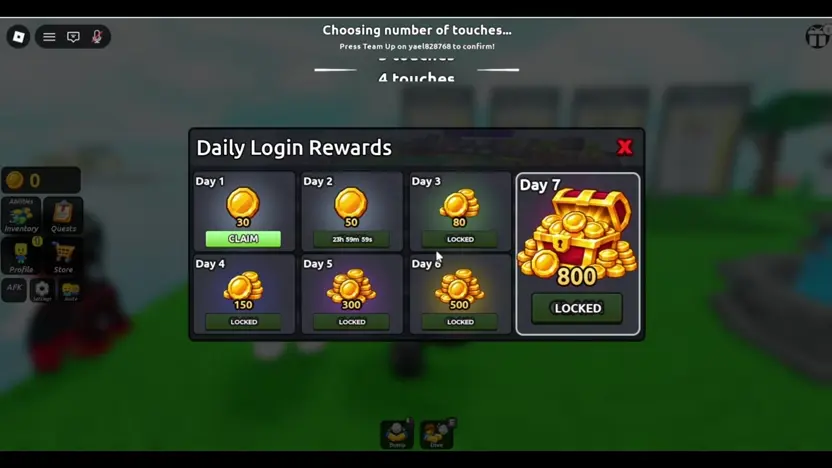
Archived gameplay footage recorded after the initial tutorial shows a Daily Login Rewards window appearing in the main lobby. This interface presents a seven-day layout divided into individual tiles for consecutive logins.
In the recording, Day 1 offers Claim for 30 coins and Day 2 has a countdown. Days 3 through 7 show Locked. The displayed coin amounts for Days 1 to 7 were 30, 50, 80, 150, 300, 500, and 800. Check your panel for current amounts and availability.
Navigating the Jackpot Spin Menu
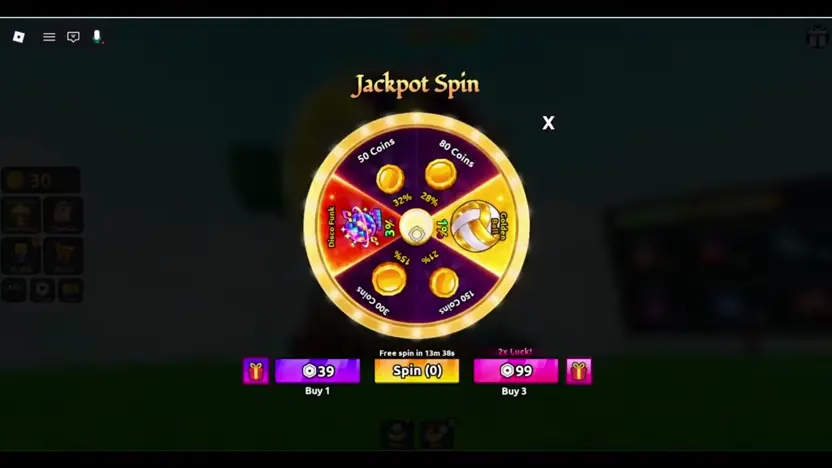
During lobby exploration, the recorded footage also opens a Jackpot Spin menu. This interface displays wheel spin options alongside prompts that include paid purchase choices.
The recording shows a free-spin countdown over Spin (0), alongside separate Buy 1 and Buy 3 buttons. Wait for your own timer or available spin count and check any purchase prompt before confirming.
Status of Promotional Codes
The official game listing and reviewed player recording do not verify a public Volley Bomb code or a redemption button.
Check the developer's official listing for code announcements. Treat codes copied from another volleyball game as unverified for Volley Bomb.